
Common Charging Mistakes That Damage Your Phone Battery (And How to Fix Them)
Phone charging mistakes are one of the main reasons why smartphone batteries lose capacity quickly and degrade over time.
One of the biggest reasons smartphones lose battery health quickly is not hardware failure, but user habits. Many people unknowingly make charging mistakes that reduce battery lifespan over time. If you want your device to last longer, understanding these mistakes and how to fix them is essential.
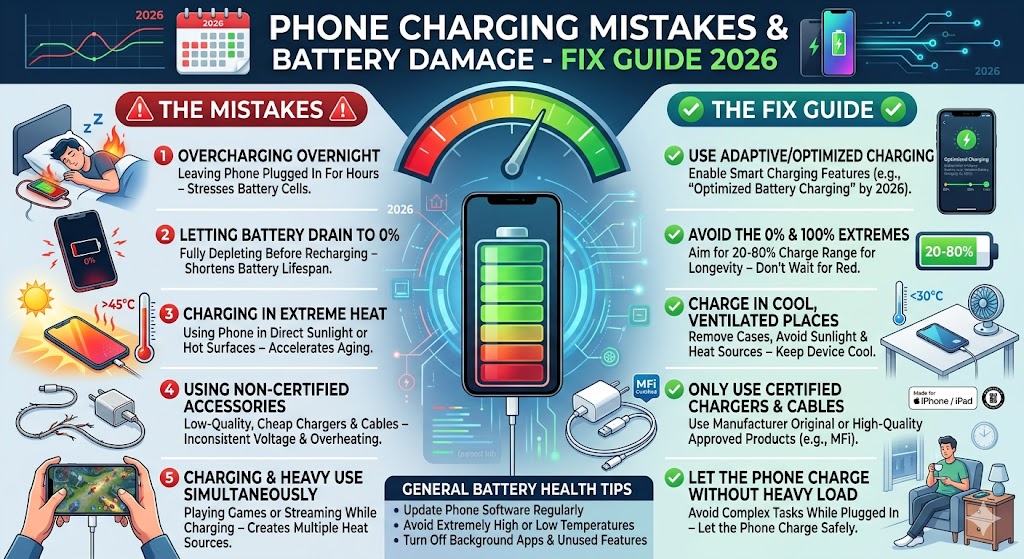
1. Charging Your Phone Overnight Every Day
Leaving your phone plugged in overnight is one of the most common habits. While modern smartphones stop charging at 100%, they continue to trickle charge, which generates heat and stresses the battery.
How to fix:
- Unplug your phone once it reaches 80–90%
- Use smart charging features if available
- Avoid keeping your phone plugged in for long periods
2. Letting Battery Drop to 0% Frequently
Many users believe fully draining the battery is good, but lithium-ion batteries actually degrade faster when regularly discharged to 0%.
How to fix:
- Keep battery between 20% and 80%
- Avoid deep discharge unless necessary
3. Using Cheap or Fake Chargers
Low-quality chargers can deliver unstable voltage, causing overheating and long-term damage to your battery and internal components.
How to fix:
- Use certified chargers from trusted brands
- Check for safety standards like CE, FCC, or RoHS
4. Charging While Gaming or Using Heavy Apps
Using your phone while charging—especially for gaming—creates excess heat. Heat is the biggest enemy of battery health.
How to fix:
- Avoid heavy usage while charging
- Let your phone rest during charging
5. Exposing Your Phone to High Temperatures
Charging your phone in hot environments, such as under sunlight or in a car, accelerates battery degradation.
How to fix:
- Charge your phone in a cool, ventilated area
- Remove the case if the device heats up
6. Using Fast Charging All the Time
Fast charging is convenient, but frequent use can increase heat and slightly reduce battery lifespan over time.
How to fix:
- Use normal charging when you are not in a hurry
- Reserve fast charging for urgent situations
7. Keeping Phone at 100% for Too Long
Lithium-ion batteries degrade faster when kept at full charge for extended periods.
How to fix:
- Unplug once fully charged
- Avoid storing your phone at 100% for long durations
Best Charging Habits to Extend Battery Life
To maximize your battery lifespan, follow these best practices:
- Keep battery level between 20% and 80%
- Avoid overheating during charging
- Use high-quality cables and chargers
- Enable battery optimization features
Signs Your Battery Is Degrading
- Battery drains quickly
- Phone heats up easily
- Charging becomes inconsistent
- Unexpected shutdowns
How Lithium-Ion Batteries Actually Work
To understand why phone charging mistakes are harmful, it is important to know how lithium-ion batteries function. These batteries store energy through chemical reactions, and every charge cycle slightly reduces their total capacity.
A full charge cycle means using 100% of the battery, not necessarily in one go. For example, using 50% today and 50% tomorrow equals one full cycle. Over time, these cycles reduce battery health.
Ideal Charging Range for Maximum Battery Lifespan
Experts agree that keeping your battery between 20% and 80% is the best practice. This range minimizes stress on the battery and helps maintain long-term performance.
- Below 20%: increases battery stress
- Above 80–90%: increases heat and voltage pressure
This is why avoiding extreme charging levels is one of the most effective ways to extend battery life.
Comparison: Good vs Bad Charging Habits
| Bad Habit | Better Alternative |
|---|---|
| Charging overnight daily | Charge during the day and unplug early |
| Letting battery drop to 0% | Recharge at 20–30% |
| Using cheap chargers | Use certified accessories |
| Gaming while charging | Avoid heavy use during charging |
Does Fast Charging Really Damage Your Battery?
Fast charging itself is not dangerous when using high-quality devices. Modern smartphones are designed with smart charging systems that regulate heat and power.
However, excessive heat from continuous fast charging can accelerate battery wear. That’s why balance is important.
- Use fast charging when needed
- Use normal charging for overnight or long sessions
Wireless Charging vs Wired Charging
Wireless charging is convenient but typically generates more heat than wired charging. This extra heat can slightly reduce battery lifespan over time.
If you want maximum battery health, wired charging is generally better. However, occasional wireless charging is perfectly fine.
How to Store Your Phone Battery Properly
If you are not using your phone for a long time, proper storage is important:
- Keep battery level around 50%
- Store in a cool, dry place
- Avoid full charge or full discharge during storage
Advanced Tips to Extend Battery Life
In addition to avoiding phone charging mistakes, you can apply these advanced tips:
- Enable battery optimization settings
- Reduce screen brightness
- Turn off background apps
- Update software regularly
When Should You Replace Your Phone Battery?
Even with proper care, all batteries degrade over time. Here are signs that you may need a replacement:
- Battery drains unusually fast
- Phone overheats frequently
- Battery percentage jumps unexpectedly
- Device shuts down suddenly
Frequently Asked Questions (Advanced)
1. Is it bad to charge your phone multiple times a day?
No, frequent small charges are actually better than full charge cycles.
2. Should I turn off my phone while charging?
It is not necessary, but it can slightly reduce heat and improve charging speed.
3. Does airplane mode help charging faster?
Yes, because it reduces power consumption during charging.
4. Can power banks damage my battery?
Only low-quality power banks can cause issues. Certified products are safe.
5. What is the biggest battery killer?
Heat is the number one factor that damages battery health.
Final Conclusion
Phone charging mistakes are one of the main reasons why smartphone batteries degrade quickly. By understanding how batteries work and adopting better charging habits, you can significantly extend your device’s lifespan.
Simple changes like avoiding overheating, using quality chargers, and maintaining proper charge levels can make a huge difference. In 2026, smart usage is just as important as smart technology.
Conclusion
Avoiding common charging mistakes can significantly extend your phone’s battery life. Simple habits like avoiding overheating, using quality chargers, and maintaining proper charge levels can make a big difference.
By applying these tips, you not only protect your battery but also improve your overall smartphone experience.
