
How to Transfer Data from Old Phone to New Phone: 7 Easy & Safe Ways
Getting a new smartphone is exciting, but moving your data can feel stressful. If you don’t know how to transfer data from old phone to new phone, you may risk losing important files like contacts, photos, and apps. This guide will walk you through the easiest and safest ways to transfer everything quickly.
Why Data Transfer Is Important
Your phone contains essential information such as contacts, messages, photos, and app data. A proper transfer ensures nothing is lost during the upgrade process.
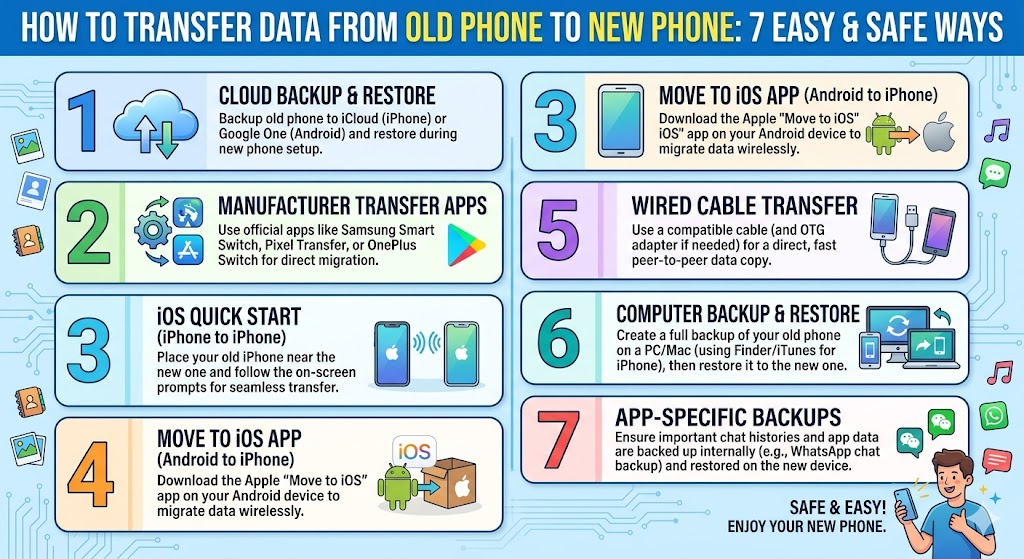
7 Easy Ways to Transfer Data
1. Use Built-in Transfer Tools
Both Android and iPhone offer built-in tools to transfer data. These tools guide you step by step and are the safest option for beginners.
2. Transfer via Google Account (Android)
Back up your data to your Google account, then sign in on your new phone to restore everything automatically.
3. Use iCloud (iPhone)
Apple users can back up data to iCloud and restore it on the new device during setup.
4. Use Cable Transfer
Connecting both phones with a cable allows fast and stable data transfer, especially for large files.
5. Use Third-Party Apps
Apps like SHAREit or Smart Switch can help transfer files wirelessly between devices.
6. Transfer via Computer
You can back up your old phone to a computer and restore it to your new device.
7. Manual Transfer
For smaller data, you can manually move files like photos, documents, and music.
What Data Can Be Transferred?
- Contacts and call logs
- Messages and chat history
- Photos and videos
- Apps and app data
- Settings and preferences
Android to iPhone Transfer
Switching from Android to iPhone? Use the “Move to iOS” app to transfer contacts, messages, and media files easily.
iPhone to Android Transfer
You can use Google Drive or manufacturer tools to move data from iPhone to Android.
Common Mistakes to Avoid
- Not backing up data before transfer
- Interrupting the transfer process
- Using unstable internet connection
- Skipping important data selection
Tips for a Smooth Transfer
Ensure both devices are fully charged and connected to a stable network. Keep them close together during wireless transfer.
FAQ
Will I lose my data during transfer?
Not if you follow proper steps and create backups.
How long does data transfer take?
It depends on the data size, usually from a few minutes to an hour.
Is wireless transfer safe?
Yes, as long as you use trusted apps and secure connections.
Preparing Before Data Transfer
Before you begin the process, preparation is extremely important. Taking a few minutes to prepare can help you avoid errors and data loss. One of the most important steps in transfer data from old phone to new phone is making sure your old device is properly backed up.
Check that your contacts, photos, and important files are safely stored either in the cloud or on your computer. This ensures that even if something goes wrong during the transfer, your data is still safe.
Wireless vs Cable Transfer: Which Is Better?
There are two main ways to transfer data: wireless and cable transfer. Each method has its own advantages and disadvantages.
Wireless transfer is convenient because it does not require cables. However, it can be slower and may fail if the connection is unstable.
Cable transfer, on the other hand, is faster and more stable. It is the best option when transferring large amounts of data such as videos or apps.
How Long Does Data Transfer Take?
The time required depends on how much data you have. Small transfers may take only a few minutes, while larger transfers can take up to an hour or more.
To speed up the process, make sure both devices are fully charged and connected to a stable network. This is a key factor when performing transfer data from old phone to new phone.
What to Do If Transfer Fails
Sometimes the transfer process may fail due to connection issues or system errors. If this happens, do not panic. Simply restart both devices and try again.
You can also switch to another method, such as using a cable instead of wireless transfer. Having multiple options is helpful when learning how to transfer data from old phone to new phone effectively.
Security Tips During Data Transfer
Security is often overlooked during data transfer. Avoid using public Wi-Fi networks, as they can expose your data to risks. Always use secure connections when transferring sensitive information.
Make sure to log out of your accounts on the old phone after completing the transfer. This prevents unauthorized access to your personal data.
Cleaning Your Old Phone After Transfer
Once the transfer is complete, it is recommended to reset your old phone. This ensures that your personal data is completely removed before selling or giving away the device.
Performing a factory reset is a crucial step in protecting your privacy after you transfer data from old phone to new phone.
Extra Tips for a Smooth Experience
- Keep both devices close together during transfer
- Do not interrupt the process
- Use official tools whenever possible
- Double-check your data after transfer
Following these tips will help ensure that your data transfer is fast, safe, and successful.
Avoiding these mistakes is a crucial part of learning how to secure your phone from hackers effectively.
Long-Term Security Habits
Building good habits is the best way to stay protected. Regularly review your apps, remove unused ones, and keep your device clean from unnecessary data.
Also, stay informed about new security threats and update your knowledge regularly. Cybersecurity is constantly evolving, and staying aware helps you stay protected.
Conclusion
If you suspect your phone has been compromised, act quickly. First, disconnect from the internet to stop further data transfer. Then, remove any suspicious apps and run a security scan.
You should also change all important passwords, especially for banking, email, and social media accounts. In serious cases, performing a factory reset may be necessary.
Best Security Apps to Consider
Learning how to transfer data from old phone to new phone ensures a smooth upgrade experience. By using the right method, you can move all your data safely without losing anything.
Choose the method that suits your needs and enjoy your new device without any worries.
